Route Redistribution
🎯 مقصدObjectiveObjective
اس لیب میں آپ دو routing پروٹوکولز کے درمیان mutual redistribution، seed metric کا کردار، اور route tags کا استعمال سیکھیں گے۔
Is lab mein aap do routing protocols ke darmiyan mutual redistribution, seed metric ka kirdar, aur route tags ka istemal seekhenge.
In this lab you will learn mutual redistribution between two routing protocols, the role of seed metrics, and the use of route tags.
💡 آسان مثالSimple analogySimple analogy
Redistribution ایسے ہے جیسے دو مختلف زبانوں بولنے والے محلوں کے درمیان ترجمان — EIGRP کی خبریں OSPF کو اور OSPF کی EIGRP کو سمجھائی جاتی ہیں۔ Seed metric ترجمان کی پہلی قیمت ہے، اور route tag ہر خبر پر لگا ہوا رنگین اسٹیکر ہے تاکہ پتہ چلے یہ کہاں سے آئی اور واپس نہ بھیجی جائے۔
Redistribution aise hai jaise do mukhtalif zubanein bolne wale mahallon ke darmiyan tarjuman — EIGRP ki khabrein OSPF ko aur OSPF ki EIGRP ko samjhai jati hain. Seed metric tarjuman ki pehli qeemat hai, aur route tag har khabar par laga hua rangeen sticker hai taake pata chale ye kahan se aayi aur wapas na bheji jaye.
Redistribution is like a translator between two districts speaking different languages — EIGRP news is explained to OSPF and vice versa. The seed metric is the translator's starting price, and a route tag is a colored sticker on each news item showing where it came from so it isn't sent back.
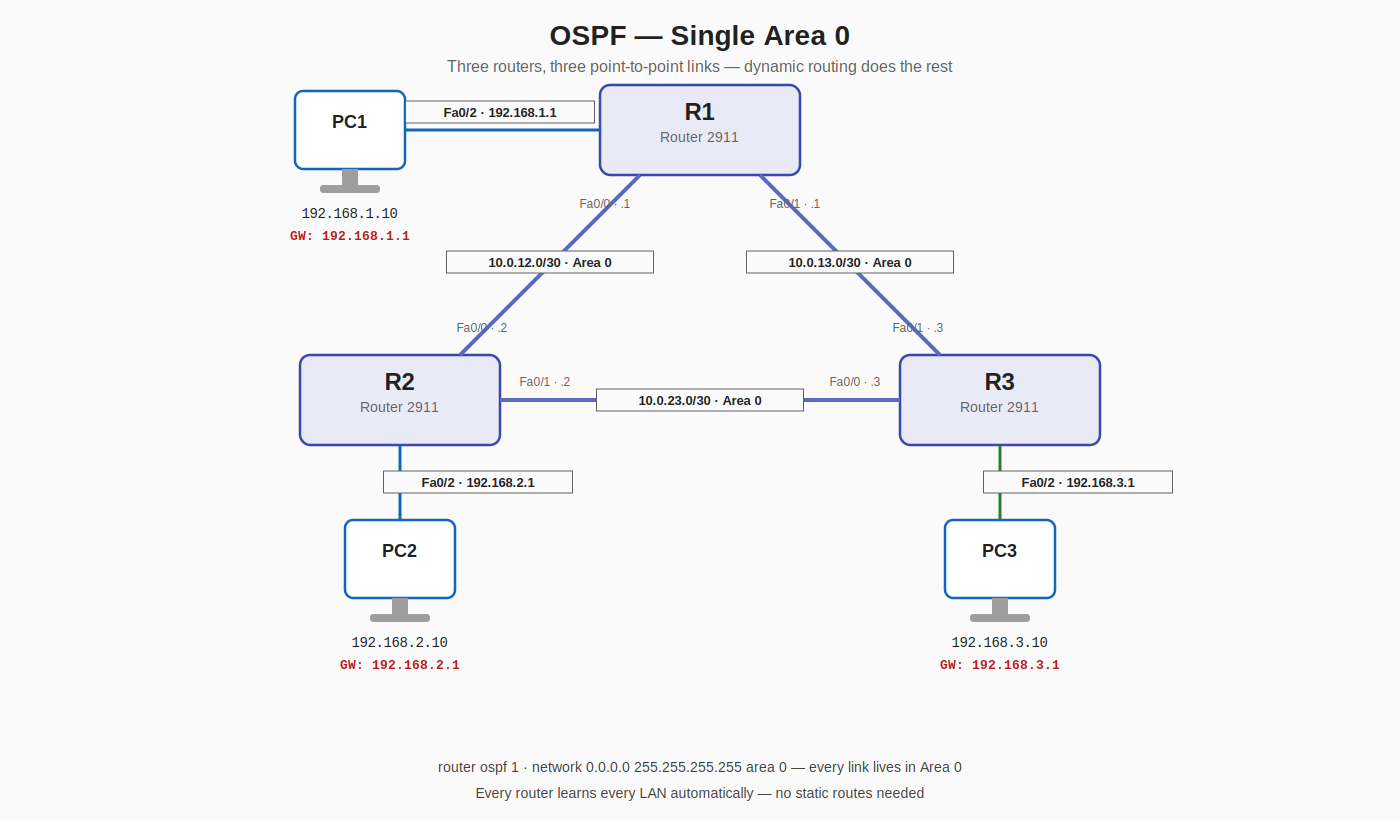
🧪 سیٹ اپSetupSetup
R1 اور R2 کے درمیان EIGRP AS 100 چل رہا ہے، R2 اور R3 کے درمیان OSPF ایریا 0۔ R2 دونوں پروٹوکول چلاتا ہے (redistribution point)۔ R1 کے پیچھے 10.1.0.0/16، R3 کے پیچھے 10.3.0.0/16۔
R1 aur R2 ke darmiyan EIGRP AS 100 chal raha hai, R2 aur R3 ke darmiyan OSPF area 0. R2 dono protocol chalata hai (redistribution point). R1 ke peeche 10.1.0.0/16, R3 ke peeche 10.3.0.0/16.
EIGRP AS 100 runs between R1 and R2, OSPF area 0 between R2 and R3. R2 runs both protocols (the redistribution point). 10.1.0.0/16 sits behind R1, 10.3.0.0/16 behind R3.
👣 مراحلStepsSteps
Step 1
EIGRP کو OSPF میں redistribute کریں۔ R2 پر OSPF پروسیس میں redistribute eigrp 100 لگائیں۔ Seed metric کے بغیر EIGRP راستے OSPF میں default metric 20 کے ساتھ آئیں گے۔
EIGRP ko OSPF mein redistribute karein. R2 par OSPF process mein redistribute eigrp 100 lagayein. Seed metric ke baghair EIGRP raste OSPF mein default metric 20 ke saath aayenge.
Redistribute EIGRP into OSPF. On R2, add redistribute eigrp 100 under the OSPF process. Without a seed metric, EIGRP routes enter OSPF with default metric 20.
configure terminalrouter ospf 1redistribute eigrp 100 subnetsexitStep 2
OSPF کو EIGRP میں redistribute کریں۔ اب EIGRP پروسیس میں redistribute ospf 1 لگائیں — لیکن EIGRP کو seed metric (bandwidth, delay وغیرہ) چاہیے ہوتی ہے ورنہ راستے نہیں آئیں گے۔
OSPF ko EIGRP mein redistribute karein. Ab EIGRP process mein redistribute ospf 1 lagayein — lekin EIGRP ko seed metric (bandwidth, delay waghera) chahiye hoti hai warna raste nahi aayenge.
Redistribute OSPF into EIGRP. Now add redistribute ospf 1 under the EIGRP process — but EIGRP needs a seed metric (bandwidth, delay, etc.) or the routes won't appear.
configure terminalrouter eigrp LABaddress-family ipv4 unicast autonomous-system 100topology baseredistribute ospf 1 metric 10000 100 255 1 1500exitexit-address-familyexitStep 3
R3 پر تصدیق کریں۔ show ip route ospf میں EIGRP سے آئے راستے O E2 کوڈ کے ساتھ نظر آنے چاہئیں۔ R1 پر show ip route eigrp میں OSPF والے راستے D EX کوڈ کے ساتھ ہوں گے۔
R3 par tasdeeq karein. show ip route ospf mein EIGRP se aaye raste O E2 code ke saath nazar aane chahiye. R1 par show ip route eigrp mein OSPF wale raste D EX code ke saath honge.
Verify on R3. show ip route ospf should show EIGRP-sourced routes with the O E2 code. On R1, show ip route eigrp should show OSPF routes with the D EX code.
show ip route ospfshow ip route eigrpStep 4
Route tags لگائیں۔ Route-map بنا کر redistributed راستوں پر tag لگائیں — مثلاً EIGRP سے آنے والوں پر tag 100۔ اس سے بعد میں فلٹرنگ اور loop روک تھام آسان ہو جاتی ہے۔
Route tags lagayein. Route-map bana kar redistributed raston par tag lagayein — masalan EIGRP se aane walon par tag 100. Is se baad mein filtering aur loop rok thaam aasan ho jati hai.
Apply route tags. Build a route-map that tags redistributed routes — e.g. tag 100 on routes from EIGRP. This makes later filtering and loop prevention easy.
configure terminalroute-map EIGRP-TO-OSPF permit 10set tag 100exitrouter ospf 1redistribute eigrp 100 subnets route-map EIGRP-TO-OSPFexitStep 5
Tag کی بنیاد پر فلٹر لگائیں۔ دوسری سمت میں route-map سے tag 100 والے راستے واپس EIGRP میں جانے سے روکیں — یہ mutual redistribution میں routing loop روکنے کا معیاری طریقہ ہے۔
Tag ki bunyad par filter lagayein. Doosri simt mein route-map se tag 100 wale raste wapas EIGRP mein jane se rokein — ye mutual redistribution mein routing loop rokne ka miyari tareeqa hai.
Filter on the tag. In the other direction, use a route-map to stop tag-100 routes from going back into EIGRP — the standard way to prevent loops in mutual redistribution.
configure terminalroute-map OSPF-TO-EIGRP deny 10match tag 100exitroute-map OSPF-TO-EIGRP permit 20set tag 200exitrouter eigrp LABaddress-family ipv4 unicast autonomous-system 100topology baseredistribute ospf 1 metric 10000 100 255 1 1500 route-map OSPF-TO-EIGRPexitexit-address-familyexitStep 6
حتمی ٹیسٹ کریں۔ R1 کے LAN سے R3 کے LAN تک end-to-end ping چلائیں۔ دونوں سمتوں میں ping کامیاب ہونا چاہیے اور کوئی loop نہیں ہونا چاہیے۔
Hatmi test karein. R1 ke LAN se R3 ke LAN tak end-to-end ping chalayein. Dono simton mein ping kamyab hona chahiye aur koi loop nahi hona chahiye.
Run the final test. Ping end-to-end from R1's LAN to R3's LAN. Ping should succeed in both directions with no loop.
ping 10.3.3.1 source 10.1.1.1✅ تصدیقVerifyVerify
R3 پر O E2 راستے tag 100 کے ساتھ، R1 پر D EX راستے tag 200 کے ساتھ نظر آئیں۔ show ip route میں کوئی راستہ غائب یا duplicate نہ ہو۔
R3 par O E2 raste tag 100 ke saath, R1 par D EX raste tag 200 ke saath nazar aayein. show ip route mein koi rasta ghaib ya duplicate na ho.
R3 should show O E2 routes with tag 100, R1 should show D EX routes with tag 200. No route should be missing or duplicated in show ip route.
show ip route ospfshow ip route eigrpshow route-map🔧 مسائل کا حلTroubleshootingTroubleshooting
Seed metric چیک کریں (EIGRP میں لازمی)، OSPF میں subnets keyword لگا ہے یا نہیں دیکھیں، اور route-map میں کوئی غلط deny تو نہیں۔Seed metric check karein (EIGRP mein lazmi), OSPF mein subnets keyword laga hai ya nahi dekhein, aur route-map mein koi ghalat deny to nahi.Check the seed metric (mandatory in EIGRP), confirm the subnets keyword in OSPF, and check the route-map for a wrong deny.
Redistributed راستوں کی AD (EIGRP external 170، OSPF E2 110) چیک کریں۔ بہتر راستے کے لیے AD ٹیون کریں یا metric بہتر کریں۔Redistributed raston ki AD (EIGRP external 170, OSPF E2 110) check karein. Behtar raste ke liye AD tune karein ya metric behtar karein.Check the AD of redistributed routes (EIGRP external 170, OSPF E2 110). Tune AD or improve the metric for the better path.
🎤 انٹرویو سوالاتInterview Q&AInterview Q&A
A: ہر پروٹوکول کا میٹرک سسٹم مختلف ہے۔ Seed metric بتاتی ہے کہ دوسرے پروٹوکول کا راستہ اس پروٹوکول میں کس قیمت کے ساتھ داخل ہو۔ EIGRP میں seed metric کے بغیر redistributed راستے آتے ہی نہیں۔Har protocol ka metric system mukhtalif hai. Seed metric batati hai ke doosre protocol ka rasta is protocol mein kis qeemat ke saath dakhil ho. EIGRP mein seed metric ke baghair redistributed raste aate hi nahi.Each protocol has a different metric system. The seed metric tells what cost the other protocol's route enters with. In EIGRP, redistributed routes won't appear at all without a seed metric.
A: Route tags لگا کر: ایک سمت سے آنے والے راستوں پر tag لگائیں اور دوسری سمت کے route-map میں اس tag کو deny کریں۔ اس کے علاوہ AD ٹیوننگ اور distribute-list بھی استعمال ہوتی ہے۔Route tags laga kar: ek simt se aane wale raston par tag lagayein aur doosri simt ke route-map mein is tag ko deny karein. Is ke ilawa AD tuning aur distribute-list bhi istemal hoti hai.With route tags: tag routes coming from one direction and deny that tag in the other direction's route-map. AD tuning and distribute-lists are also used.